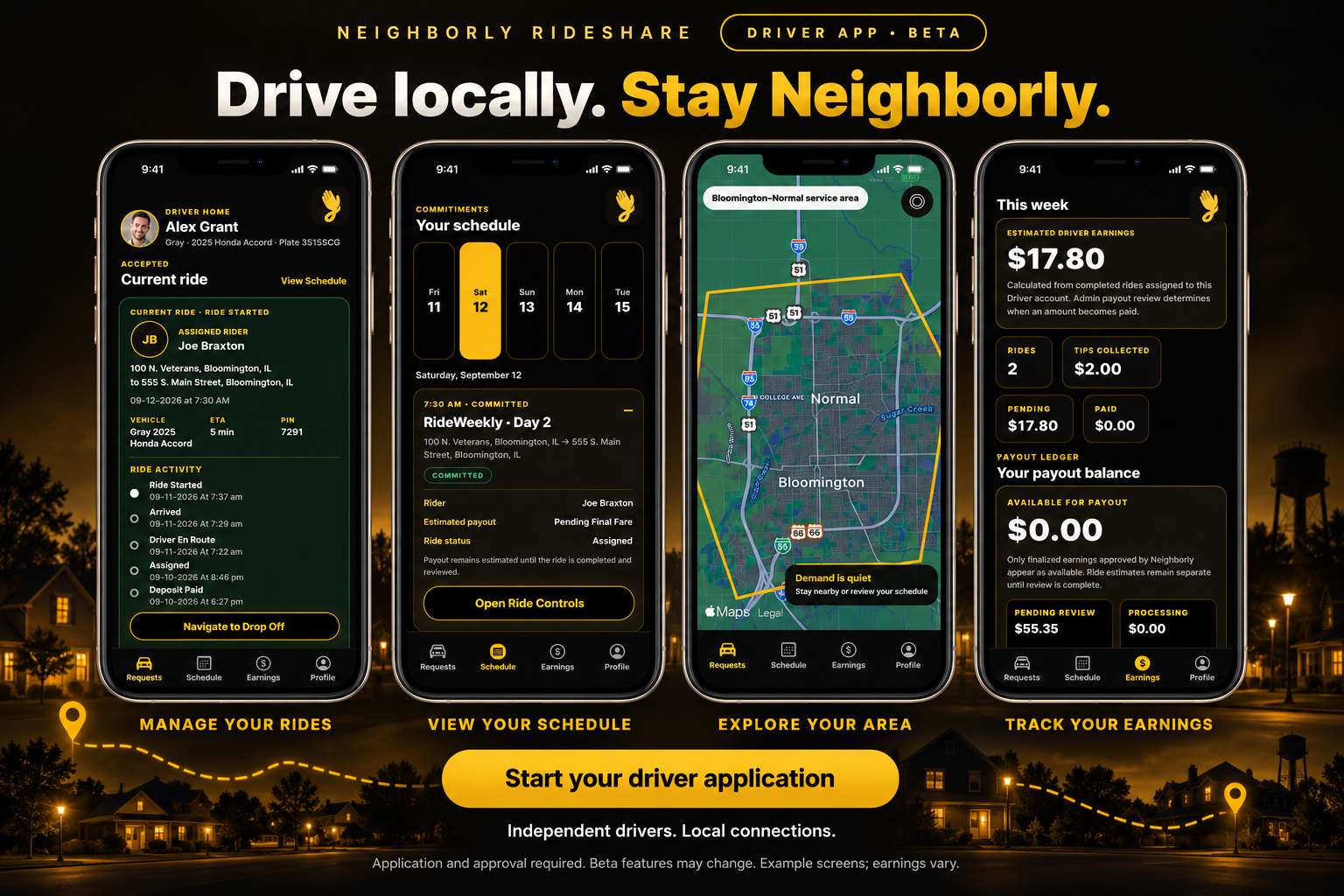
Neighborly Rideshare Driver app beta: current rides, schedule, local map and earnings.
HELP & FREQUENTLY ASKED QUESTIONS

A little guidance.
A smoother ride.

Find answers before you book, get ready for pickup, and manage your ride with confidence.

Ride requests are online only.

We no longer accept phone bookings. Enter your trip and payment details through online booking. Phone contact remains available for support and safety concerns.

The new web portal and fare estimator are coming soon. The button above opens our current booking service.

Booking online

Can I call to book a ride?
Ride requests are now online only. Phone support cannot create ride bookings. Please use the online booking options below to enter your pickup, destination, schedule, and payment details. Phone contact remains available for support and safety concerns; a call or voicemail does not reserve a ride.
How do I request a ride today?
Use current online booking for the available RideNow and RideLater options. For a recurring schedule, start with RideWeekly. Complete the required trip and payment information, then watch for confirmation and driver details.
Do I need to download an app?
You can use current online booking in a web browser. The new ride-request web portal is being prepared to complement the mobile apps. A button marked “Coming Soon” or an app beta invitation is not a completed ride request.
What information should I have ready?
Have your exact pickup and destination addresses, requested date and time, rider contact information, and payment details ready. Include useful pickup instructions and any passenger or accessibility needs through the appropriate request options. Check the information before submitting.
Does submitting a request guarantee a ride?
No. Neighborly Rideshare connects riders with independent drivers. A submitted request is subject to availability and acceptance. Check the confirmation and status information provided for your request; do not assume a ride is confirmed simply because you sent a form, message, or payment inquiry.
Can I book by text, voicemail, or the contact form?
Please use online booking for every new ride request. A support message, text, voicemail, or contact form is not a booking confirmation. If you need help completing an online request, contact support and explain where you are getting stuck.
What if I cannot find an available pickup time?
Check other available options in online booking and the latest announcements. Independent drivers may be unavailable for your requested time or route. Sending repeated requests or calling does not guarantee a driver. If your trip is time-sensitive, allow time to arrange another option.

Ride options & recurring rides

What is the difference between RideNow, RideLater, and RideWeekly?
RideNow is for a ride when a driver is available. RideLater is for planning a ride ahead of time. RideWeekly is for recurring transportation needs. Each option remains subject to the schedule, route, and driver availability shown during the request process.
How far ahead can I book?
Use the dates and times currently offered in online booking. Booking windows may differ by ride option. For recurring needs, submit your schedule through RideWeekly early enough for review; sending a request does not reserve a driver.
How do I arrange rides to work or other regular appointments?
Visit RideWeekly and provide your pickup and destination, days needed, and pickup times. Review the proposed schedule, pricing, payment requirements, and cancellation conditions before accepting. A return trip should be included in your requested schedule rather than assumed.
What is a Big Deal offer?
A Big Deal is an offer that may be available for an eligible recurring route. Read the specific discount, offer period, payment requirements, and cancellation conditions before accepting. It is not an automatic discount on every weekly request.
Can I change or stop my recurring rides?
Use the instructions provided with your recurring arrangement and contact support promptly if you need help. Review your accepted terms before changing or ending the schedule, since charges or offer conditions may apply. A change request still needs confirmation. See the Terms & Conditions.

Pricing & payments

How much will my ride cost?
Visit Pricing & Fees for the published time-based rates and minimum fare. Standard pricing uses estimated ride duration and the applicable rate. Your route, pickup time, applicable fees, or a specific offer can affect the total. Review the price provided for your request.
Can I estimate a fare on the website?
The route-based fare estimator is coming soon and is not available yet. For now, review Pricing & Fees and the pricing provided in the current request process. A price estimate alone does not book a ride or guarantee availability.
What payment methods can I use?
Platform-arranged fares require electronic payment through the official payment process. Use the payment methods shown at checkout. Complete any required payment information so your request can be processed. Do not send payment card details through a support form or text message.
Can I pay cash or tip my driver?
Cash is not accepted for the ride fare. Cash tips are accepted. Keep fare payments within the official platform payment process, and do not arrange a private cash ride with someone claiming to be your assigned driver.
Are there waiting, cancellation, or no-show fees?
Fees may apply for waiting time, late cancellation, same-day rescheduling, or a no-show. Review the amounts and conditions applicable to your request in the booking information and Terms & Conditions.
How do I ask about a charge or refund?
Review the Refund Policy, then contact support with the ride date, booking reference if available, and a brief description of the charge. A refund request is reviewed under the applicable policy and is not an automatic refund. Do not include a full card number.

Pickup, changes & cancellations

Where should I wait for my driver?
Use the pickup location in your request and follow the official pickup instructions. Wait in a safe, visible place away from moving traffic, with your phone accessible. Before entering, match the driver and vehicle to the details provided for your ride.
What if my driver is late or I cannot find the vehicle?
Check your ride status and official messages for updates. Use the contact options provided for the trip or contact support with your pickup time and location. Arrival times are estimates. Do not enter an unverified vehicle or submit duplicate bookings without checking your existing request.
How do I change my pickup, destination, or time?
Use the manage-booking instructions in your confirmation or the available controls in the booking service. If those options are unavailable, contact support with the existing ride details. Changes can affect price and availability. Continue to follow your confirmed details until a change is confirmed.
How do I cancel a ride?
Use the cancellation option provided with your booking or confirmation. If you cannot access it, contact support promptly with the ride details and keep a record of your request. Cancellation fees may apply. Not showing up, closing the app, or leaving a voicemail is not the same as receiving cancellation confirmation.
What if I missed my pickup?
Check your ride messages and contact support about the existing request. A driver may not be able to wait or return, and a no-show fee may apply under your booking terms. If you still need transportation, use online booking to check for another available ride.
What should I do if I left something in a vehicle?
Use Contact Support and include the trip date, pickup time, and a description of the item. Avoid posting personal trip details publicly. Support can review the report, but recovery and return of an item cannot be guaranteed.

Service area & rider needs

Where can I request a ride?
Our core area is Bloomington–Normal. Listed surrounding towns are Downs, Towanda, Hudson, Carlock, Heyworth, Lexington, and Danvers. Review the Service Area page for supported routes. Independent drivers choose which requests they accept.
Can I request trips outside the service area?
Requests outside Bloomington–Normal and the listed areas are not currently supported. Do not assume that any trip between surrounding towns is available. Check that your specific pickup and destination are supported before making plans.
Are rides always available, including overnight or bad weather?
No. Availability depends on independent drivers, scheduling, route, and conditions. Published pricing windows do not guarantee operating hours. Check current booking availability and Announcements for service updates.
How do I request an accessibility accommodation?
Include relevant accessibility needs through the available request options, or contact support for help with the online process. Explain practical needs, such as mobility equipment or boarding assistance, without sending unnecessary medical information. Confirm the arrangement before relying on a particular vehicle or accommodation.
Can children or teens use Neighborly Rideshare?
Review the applicable service and eligibility requirements before requesting a ride involving a minor. Children and teens may need a specific arrangement and parent or guardian involvement. Do not assume a standard adult booking covers an unaccompanied minor. Ask support about the appropriate process.
Can I bring an animal, luggage, or extra passengers?
Provide relevant details through the request process and check the applicable requirements before pickup. Service animals and pets have different requirements; contact support if you need help with an accommodation. Vehicle space and passenger capacity vary. Do not assume extra passengers or large items can be accommodated without confirmation.

Safety & verification

How do I verify my driver before getting in?
Compare the driver name, vehicle description, and license plate with your official ride details. Ask who the driver is there to pick up. A logo or decal alone is not enough. Review Pickup Safety & Security and the Driver Verification page.
What if the driver or vehicle does not match?
Do not enter the vehicle. Move to a safe location and contact support with the ride details and the mismatch. Do not accept a replacement or private ride from an unverified person. If you are in immediate danger, call 911.
What should I do with a ride verification code?
If your trip requires an OTP or QR code, follow the official instructions after confirming the correct driver and vehicle. Do not send a ride code ahead of the vehicle’s arrival. Account login codes and passwords are separate: never share those with a driver or in a support message.
How do I report unsafe behavior or suspected impairment?
Address immediate danger first, then follow the reporting options on our Safety Policy & Reporting page. Include the ride details and what happened. Neighborly has a zero-tolerance policy for impaired driving. Safety contact channels remain available even though phone booking has ended.
Is Neighborly Rideshare an emergency service?
No. For immediate danger, a medical emergency, or a serious collision, call 911 first. Do not wait for a ride request, app response, or support reply to obtain emergency assistance.

Apps, accounts & support

How do I join the Rider app public beta?
Visit the Rider app beta section for updates. Review and sign the Beta Testing Agreement before following the official iOS or Android installation instructions when available. A beta invitation or a button marked as pending does not provide an active download or confirm a ride.
What should I expect while testing the app?
Beta features may change, and you may encounter bugs or interruptions. Follow the testing instructions and do not assume every screen or feature is ready for live rides. Continue to use the currently available booking options when needed.
How do I report an app problem or get account help?
Use the available in-app support option or Contact Support. Include your device type, app version if known, the steps that caused the issue, and an appropriate screenshot. Remove passwords, login codes, payment details, and other sensitive information.
Where can I read the policies or request account deletion?
Visit Legal & Privacy for the terms, privacy policy, and related policies. Use the Account Deletion page to request deletion. Ownership verification and review may be needed, and some records may be retained as described in the policies.
I still need help. What should I send support?
Use Contact Support with a clear description, relevant ride date and time, and a booking reference if available. Include how to reach you. Support can help with an existing ride or the online process, but phone calls and contact forms do not create new ride bookings. For safety concerns, use Safety Reporting.
How can I become a driver?
Visit Become a Driver to learn about the Driver app beta and begin the application and alignment survey. Submitting an application does not mean you are approved to accept rides; follow the review and onboarding instructions.
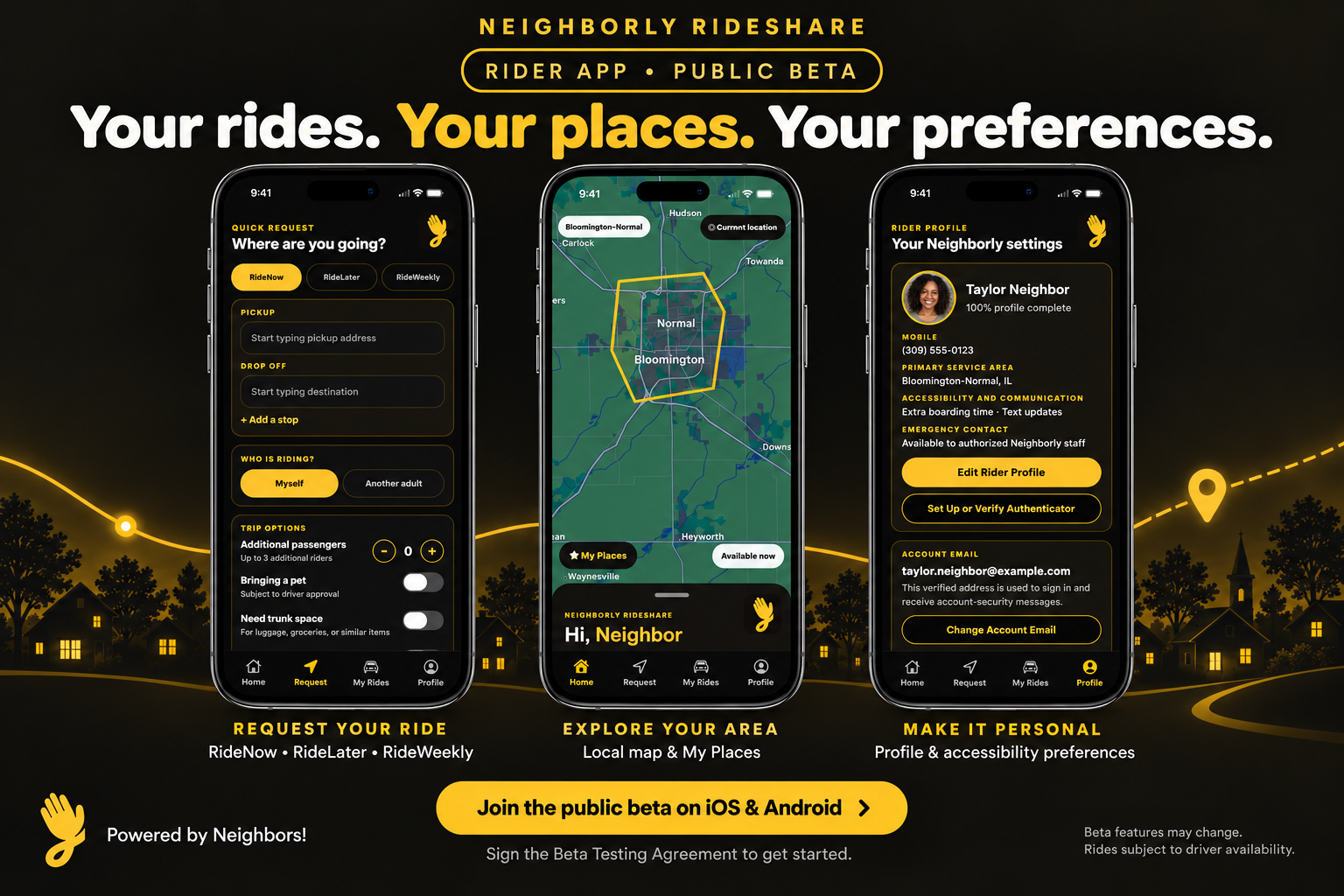
Neighborly Rider app: request rides, explore the local map and My Places, and manage your rider profile and accessibility preferences.

-Rides Powered By Neighbors

Service is only available in Bloomington-Normal Illinois and some surrounding towns.

Lets Ride!

Please Select A Ride Option Below:

Ride Now Logo. A clock with a warning symbol and exclamation mark indicating a time alarm or alert.
Ride Later. Simple illustration of an hourglass with yellow sand flowing from the top chamber to the bottom chamber against a black background.
Ride Weekly Logo. A digital calendar with a gold border and black background, displaying rows of empty white squares representing days.

Important: Requests without completed payment details may not be dispatched. This helps protect our independent drivers’ time and ensures fair use of the platform.

Simple, Transparent Pricing!

Morning Rate: 6 AM - 6 PM

$1.07 per minute

Evening Rate: 6 PM - 12 AM

$1.17 per minute

Overnight Rate: 12 AM - 6 AM

$1.27 per minute

Minimum Rate: 6 Minutes and Under

$6.42
minimum

  • Pricing is automatically calculated by the software based on the estimated ride duration using Google Maps.

  • Independent drivers who accept ride assignments through the platform agree to these standard rates unless they choose to provide an alternative offer.

Wait-Time, Late Cancellation, Same Day Reschedule, and No-Show Fees May Apply


Payments We Accept

Logo representing a credit card or debit card.

We Accept All Major Credit and Debit Cards via:

Black Squarespace logo with the word 'Square' underneath.

Where We Connect Drivers and Riders

Below are the areas where ride requests can be made through our platform:

Towns Within ~15 Minutes of Bloomington-Normal:
• Downs
• Towanda
• Hudson
• Carlock
• Heyworth
• Lexington
• Danvers

FAQs

Where does Neighborly Rideshare provide service?

Neighborly Rideshare’s platform connects riders with independent drivers within Bloomington-Normal

Does Neighborly Rideshare travel to other outside cities and towns?

Ride requests outside the listed areas cannot currently be matched through our platform. Here’s the list:

Bloomington, Normal, Kappa, Hudson, Towanda, Downs, Heyworth, McLean, Sanford, Danvers, Lexington and Carlock,

How do I have the best experience with Neighborly Rideshare?

We highly recommend that customers be proactive with booking rides on our service. If you're booking for work, school, or appointments; Ride Later and Ride Weekly service is our most reliable and efficient services.

Does Neighborly Rideshare rent out vehicles?

Unfortunately not at this time.

Do you accept cash payments?

Neighborly Rideshare does not accept or process cash for platform-arranged trips. All payments must be completed electronically for security and compliance. Drivers are independent contractors and may conduct their own business outside the platform at their discretion.

Is Neighborly Rideshare safe?

All independent drivers undergo background screening and driving record checks before being approved to accept trips through the platform.

Customer Reviews

I love riding with this Rideshare! The drivers are excellent and they always get you where you need to go on time. I am so glad we have this convenience in our town and no longer have to take Uber or Lyft! I would recommend Neighborly Rideshare to everyone and excited to see this company grow!
— Colleen Romain, 5 Star Google Review
Great customer service! Always on time and very reliable. Very friendly. Doesn’t rush if you don’t come right out. You will always have a ride, especially if you book in advance.
— Niah Niah, 5 Star Google Review
Ever since it was started in January 2023, Neighborly Rideshare has shown to be one of the best rideshare companies around. My first ever ride with Tristan sealed the deal of never having to use Uber again. With nice service, a nice fleet of vehicles , smooth rides, and a warm welcome every time you get in the car, Neighborly Rideshare is my definite go-to! 10/10 no doubt trying again!
— KJ Hughes, 5 Star Google Review

Hour Of Operations

Online Booking Hours
Monday–Sunday
6 am–10 pm

Official Support Phone #
(833) 443-2863

Office Location

501 North Main Street Suite 7

Bloomington Illinois, 61701